Your clients show up.
Every time.

Send automatic WhatsApp reminders before every appointment. Fewer no-shows, less phone tag, more billable hours.

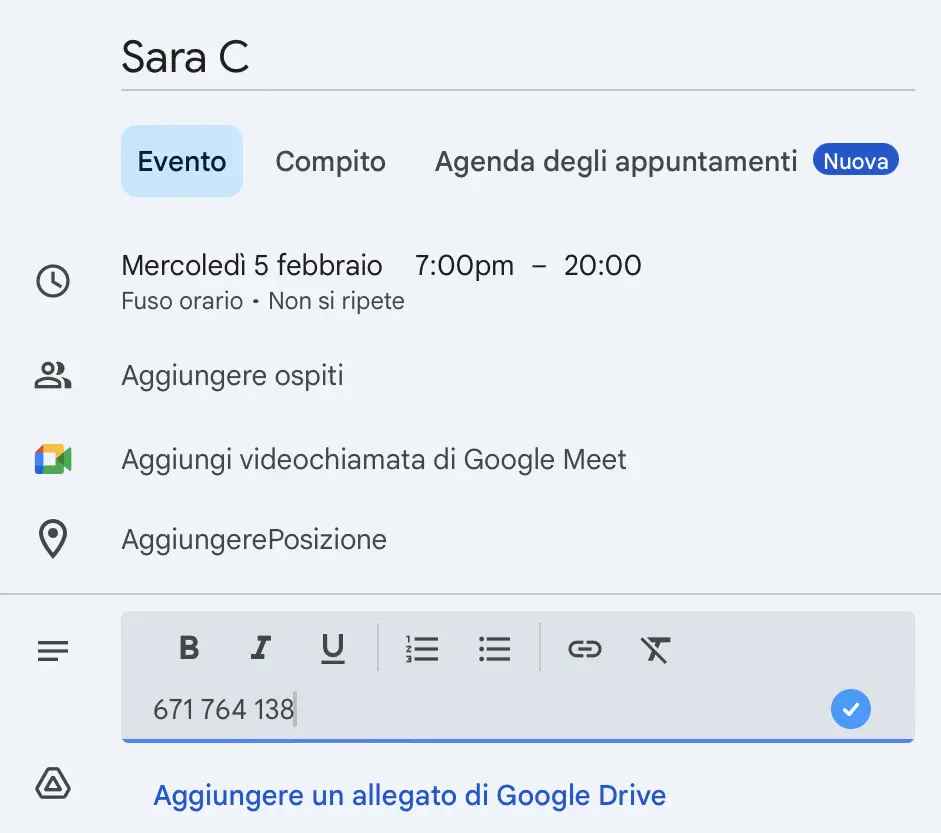
Sync your Google Calendar, create appointments in the app, or import from Excel. Pick what fits your workflow.

Start Free

Google Calendar

Create directly in the app

Import Excel/CSV (Team+)

Why RicordamiApp

Reminders your clients actually read

WhatsApp reminders go out on autopilot so you can keep your schedule full, however you manage your appointments.

94% open rate on WhatsApp

SMS gets ignored. Emails get buried. WhatsApp messages get read within minutes.

Fewer no-shows

Every empty slot costs you money. A quick WhatsApp reminder keeps your calendar full.

Hours back in your week

Stop texting clients one by one. RicordamiApp sends every reminder for you, around the clock.

Set it up once. Reminders go out on their own.

Connect Google Calendar, add appointments in the app, or upload a spreadsheet. RicordamiApp handles the rest: WhatsApp reminders, client confirmations, status updates.

Add your appointments

Step 1: Add appointments your way

Connect your Google Calendar

Your appointments sync automatically. Add the client's phone number to the event title or description and you're set.

Create appointments in the app

No Google Calendar? No problem. Add appointments straight in RicordamiApp, no integrations needed.

Import from Excel/CSV (Team and Business plans)

Got a spreadsheet of appointments? Upload it and schedule hundreds of reminders at once.

Automatic WhatsApp reminders

Step 2: Your client gets a WhatsApp reminder, automatically

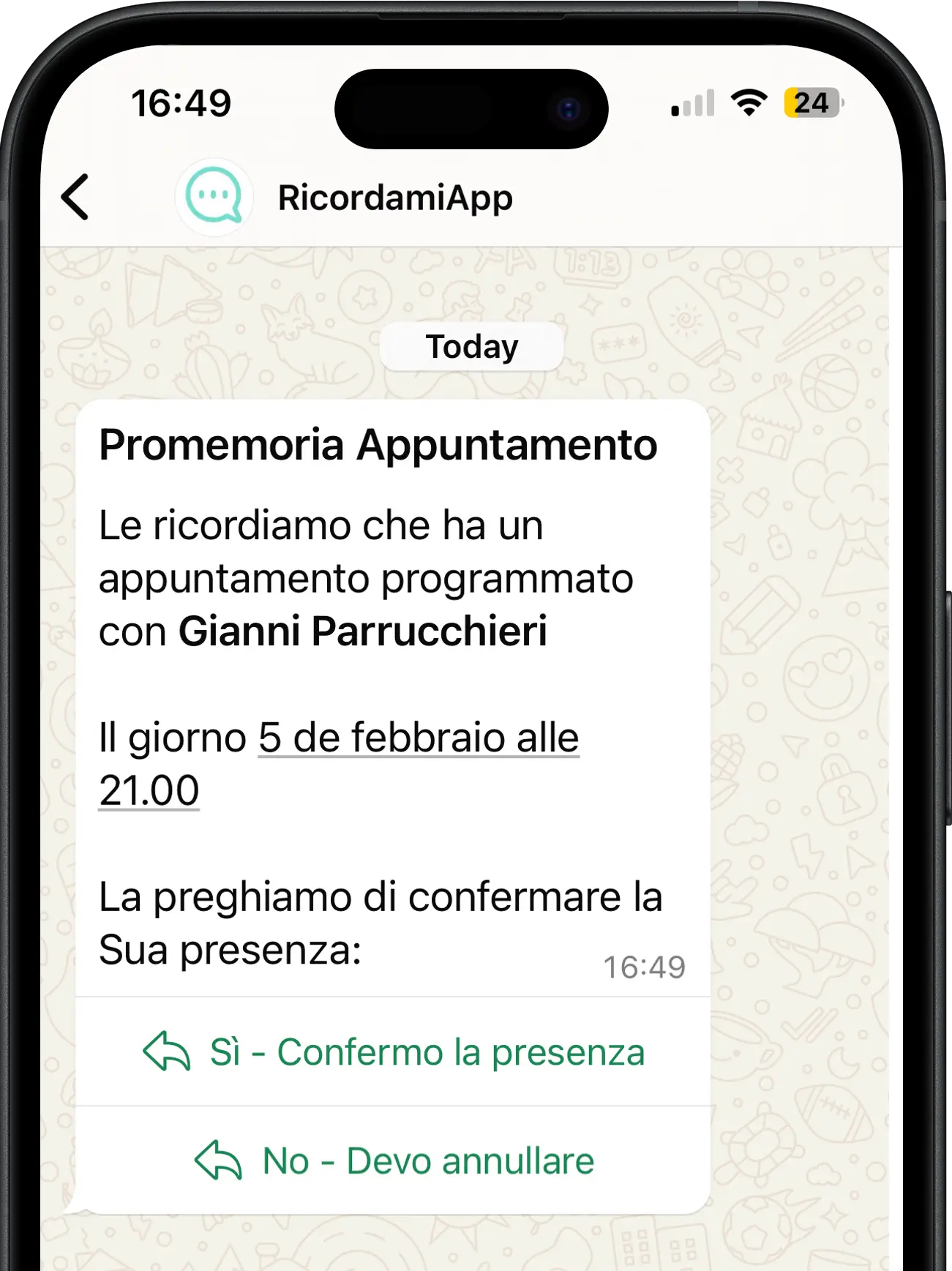
At the time you choose (24 hours before, 2 hours before, or both), RicordamiApp sends a WhatsApp message to your client.

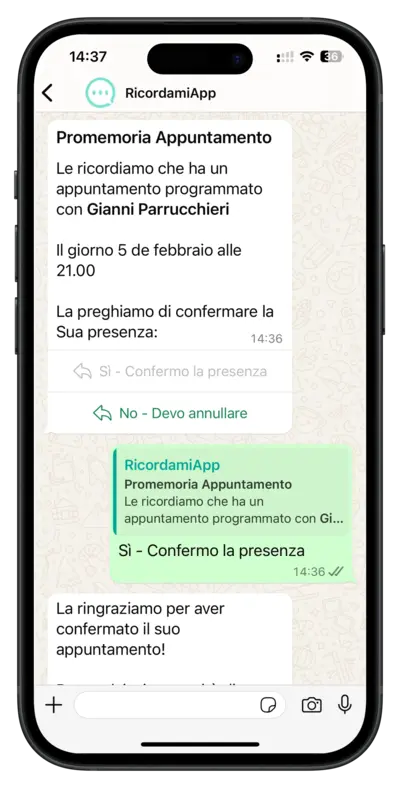
Send a simple heads-up ("See you tomorrow at 3:00 PM") or ask for confirmation ("Reply YES to confirm your appointment").

Powered by the official WhatsApp Business API

Auto-updated statuses

Step 3: See who confirmed and who cancelled, at a glance

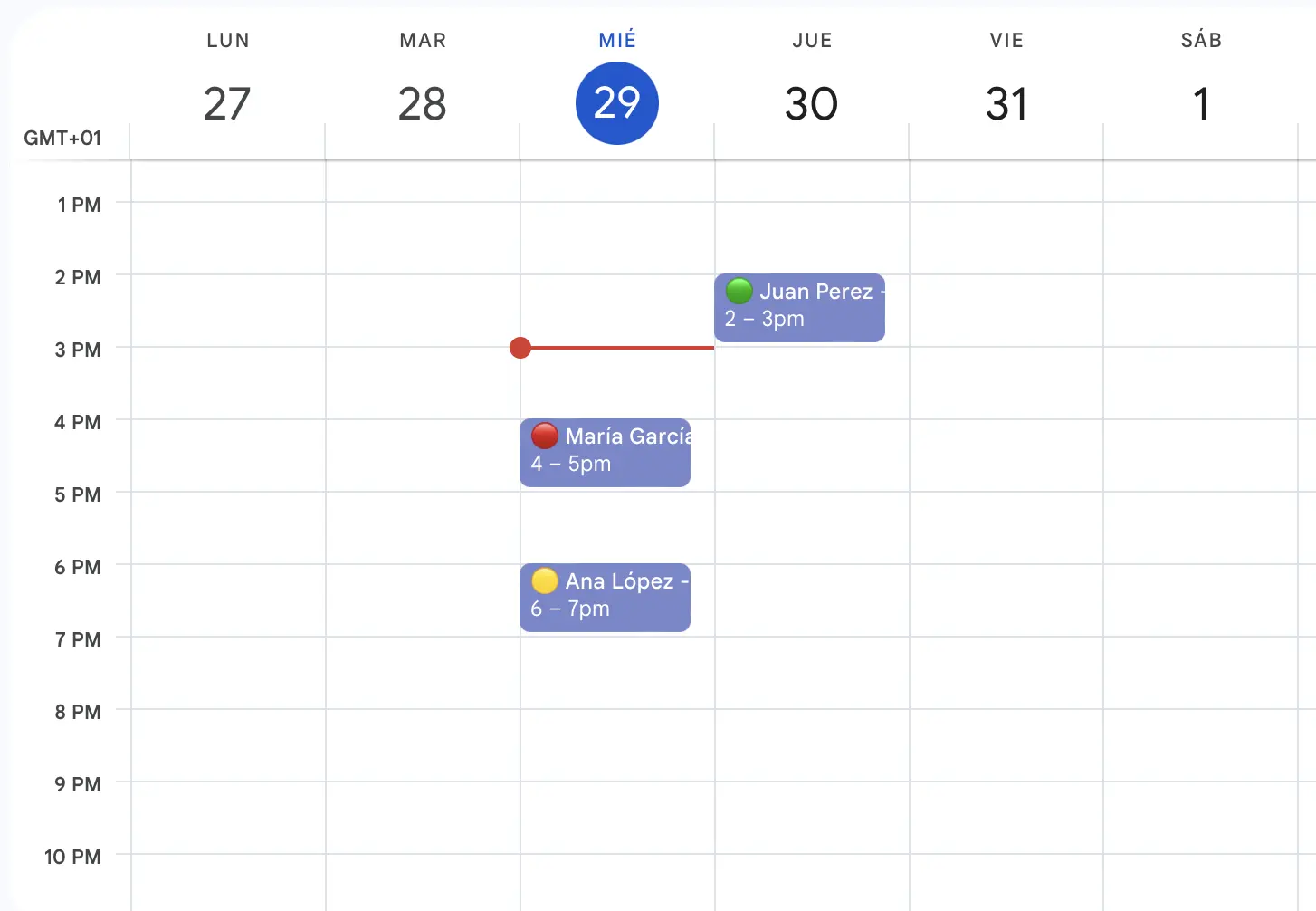
When clients reply, RicordamiApp updates each appointment status for you.

๐ŸŸก

Reminder sent

The reminder went out. Waiting for your client to reply.
๐ŸŸข

Appointment confirmed

Your client confirmed. You're good to go.
๐Ÿ”ด

Appointment cancelled

Your client cancelled. The slot is free to rebook.

See what your clients will receive

Pricing

Simple, transparent pricing

Try RicordamiApp free for 15 days. No credit card required.

Starter

For solo practitioners

$19 /month

Start free trial

What's included

  • 150 reminders / month
  • Create appointments in-app
  • Single calendar
  • Email support

Professional

For busy professionals

$39 /month

Start free trial

Everything in Starter plus

  • 300 reminders / month
  • Create appointments in-app
  • Multiple calendars
  • Priority support

Team

For growing teams

$69 /month

Start free trial

Everything in Professional plus

  • 550 reminders / month
  • Create appointments in-app
  • Multiple calendars
  • Excel/CSV import
  • Phone support

Business

For multi-location businesses

$99 /month

Start free trial

Everything in Team plus

  • 1000 reminders / month
  • Create appointments in-app
  • Multiple calendars
  • Excel/CSV import
  • Dedicated support
  • Custom integrations

๐Ÿ•’ Calculate how much time you'll save

100 300 1000

You'd save about 15 hours per month

That's nearly 2 full days you could spend with clients ๐Ÿ’ผ

Sending more than 1,000 reminders a month? Need to connect your practice management software? Contact us for a custom quote.

Extra reminder packs

Busier month than usual? Buy extra reminders without changing your plan. Pay once, credits never expire.

75 reminders โ€” $15 150 reminders โ€” $25 200 reminders โ€” $30 250 reminders โ€” $35

For active subscribers. Credits kick in automatically when you hit your plan's monthly limit.

Frequently asked questions

Can I customize the reminders?

Yes. You control when the reminder goes out and what it says. See our guide to customizing reminders for details.

What do I need to create a reminder?

Your client's phone number and the appointment details. In Google Calendar, add the number to the event title or description. In the app, type it into the form. For CSV imports, include a phone number column.

Do I need Google Calendar to use RicordamiApp?

No. You can create and manage appointments right inside RicordamiApp. If you already use Google Calendar, connect it for automatic syncing. Team and Business plans also support Excel/CSV imports.

What number do reminders come from?

A dedicated WhatsApp number provided by RicordamiApp. You don't need to use your personal number or set up any extra accounts.

Which calendar platforms are supported?

Google Calendar is supported today, with more coming soon. You can also create appointments in the app or import from Excel/CSV (Team and Business plans).

Can I connect multiple calendars?

Yes. Connect as many Google calendars as you need, including shared team calendars. If you don't use Google Calendar, manage everything in the app instead.

How does the Excel/CSV import work?

On Team and Business plans, upload an Excel or CSV file with phone number, event name, date, and time. RicordamiApp creates the events and schedules reminders automatically. Great for loading a full week's appointments at once.

How do payments work?

Pay monthly or annually by credit card. Payments are processed securely through Stripe. More details on our security page.

Can I change plans at any time?

Yes, from your account at any time. Upgrades take effect immediately. Downgrades apply at the next billing cycle. No extra fees either way.

Is there a long-term commitment?

No. Cancel any time. Your plan stays active until the end of your current billing period.

Do I need to provide my credit card to start the trial?

No. Start sending reminders right away with no payment info. After your first 25 reminders, pick a plan to keep going.

Is my clients' data secure?

Yes. All data is GDPR-compliant and stored in Europe. Full details on our security page.
I have more questions. How can I reach you?

Email us at [email protected] or chat with us on WhatsApp.